Targon Climb modes and Past climbs
Explore Targon Climb modes: daily play, Past climbs, Free Climb, Avalanche and Summit Showdown Beta, with local-midnight resets and archive rules.
Checked 28 November 2026 · Browser controls and original game documentation
Targon Climb offers the daily climb, Past climbs, Free Climb, Avalanche and Summit Showdown Beta. They serve different purposes: today's shared quiz, earlier daily sets, additional random questions, rapid multi-answer play and a friends showdown. Start by choosing the format you want, rather than assuming every menu button gives another scored daily attempt.
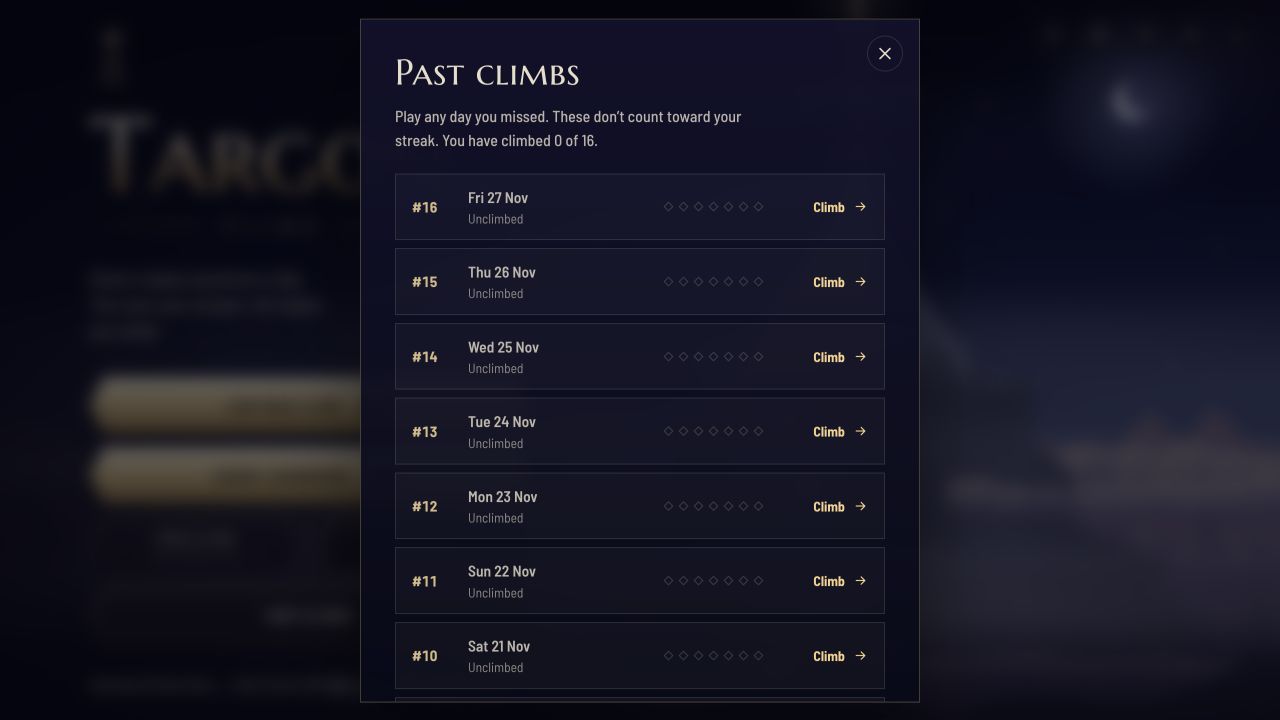
The screenshot shows the real Past climbs menu checked on 28 November 2026. The game is still evolving, so use its current labels and availability messages if your menu differs from this guide.
Today's climb and the daily reset
The daily climb contains seven questions. The creator's FAQ states that new questions arrive at midnight in your local time. That means the relevant timezone is the one used locally by your browser or device, rather than a single fixed UTC reset quoted for all players.
Use the game's countdown as the immediate reference for your next set. Check your device's date and timezone if the expected day looks wrong. Avoid changing timezone settings merely to seek another attempt: this guide does not claim that doing so resets your record.
A daily session may show Continue climb when it is unfinished. That entry means resume the current session; it should not be confused with an archive day or a random practice round. Finish and review the day's result before comparing it with friends.
Past climbs: choose an earlier date
Open Past climbs on the game menu and choose a dated row. The list includes climb numbers and completion labels, helping you distinguish an older set from today's round. Our screenshot is a snapshot of that archive, not a promise about how many dates will always be available.
The official FAQ says these earlier rounds do not count toward your streak or stats. They are useful for catching a day you missed and learning the interface without treating that activity as a replacement for the current daily result.
When asking someone about an archive question, include its climb number or date. A phrase such as yesterday's question becomes ambiguous quickly, especially when people use different local timezones.
Free Climb after finishing the day
Free Climb supplies extra climbs with random questions after the daily climb is complete. During our menu check, its button was disabled and explicitly said it would open after today's climb. A disabled button in that state is an unlock condition, not necessarily a loading failure.
Complete the daily round first, then return to the menu and read the available entry. Do not expect refreshing the website to bypass the completion requirement. Random questions also mean a practice session is not the same shared set you would compare by daily climb number.
Avalanche: several answers under pressure
Avalanche asks for multiple valid answers rather than one selection for the entire topic. The creator's controls guide describes up to five answers per topic, an eight-second timer and three lives. We also observed the live answer counter and remaining-lives indicator.
Read the category boundary before trying to type a sequence of names. Keep an eye on the game's current timer and accepted-answer counter, because they describe this format more directly than daily rarity advice. Do not assume a daily score target transfers unchanged to Avalanche.
This guide explains the format without providing a list of answers. Use the game's own feedback to see what it accepted and follow the next topic as presented.
Summit Showdown Beta with friends
The current menu also offers Summit Showdown Beta. Its setup screen describes head-to-head play with up to seven friends, the same seven questions at the same moment and an extra 50 m for an answer nobody else in that showdown gave.
The screen provides a name field, a room-creation control and a code field for joining. Arrange a session with your friends, then use those controls inside the game. We inspected the setup but did not create a room or claim to have completed a multiplayer match.
Profiles, comparisons and spoilers
Friends is a comparison feature as well as a way to connect with other players. The controls guide describes comparing climbs, streaks, Summits and Elders. Keep the format clear when discussing a result; a group bonus and an archive session are not the daily format.
For another device, the original FAQ describes Link a device and a recovery code in Settings. Keep recovery information private. The same FAQ also describes Spoiler mode for hiding answer lists until opened, which helps if you stream or share your screen.
Sources checked on 28 November 2026: the original controls guide, FAQ and live menu. Return to Targon Climb to choose a format.