How to play Targon Climb
Learn how to play Targon Climb: start the daily quiz, read each prompt, submit answers, manage the timer and review results without today's spoilers.
Checked 28 November 2026 · Browser controls and original game documentation
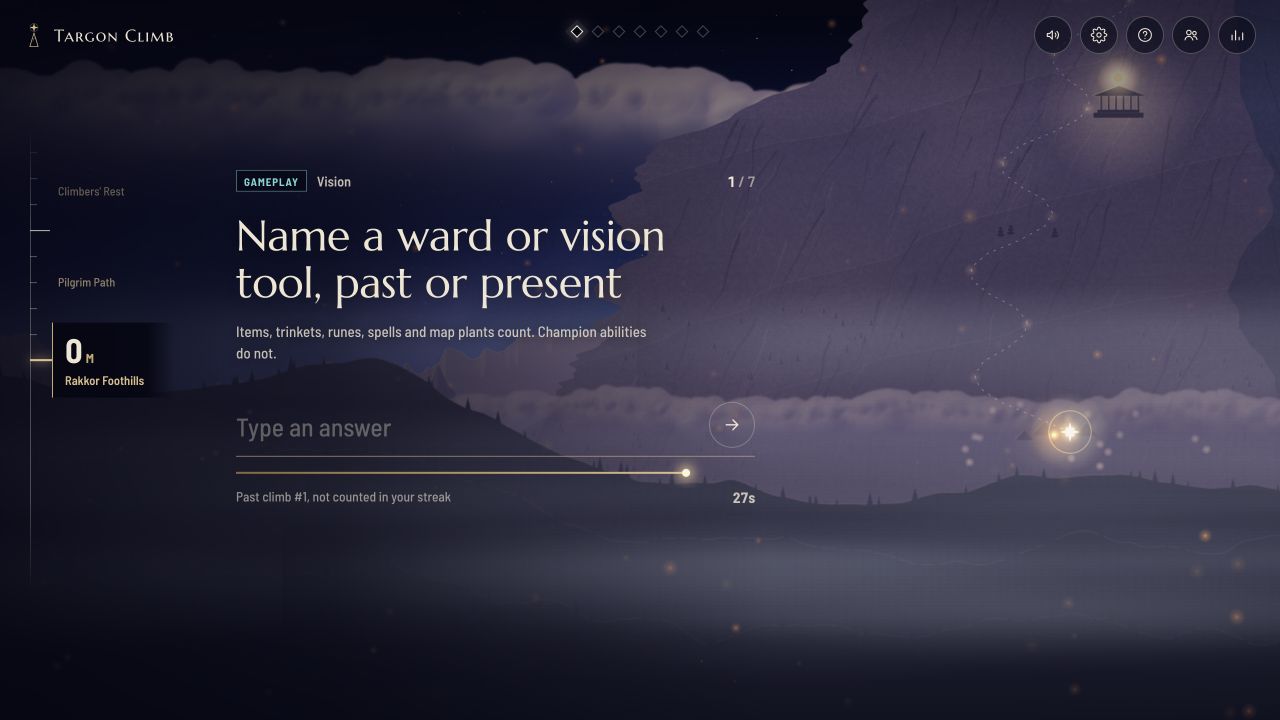
Targon Climb starts with a category and a short question. Read its conditions, enter one valid answer, then press Enter or use the submit button. You have 30 seconds for each of seven prompts. The aim is to finish with as much height as possible by choosing answers that other players are less likely to give.
This guide covers the daily quiz controls, using a historical round for the screenshot. It keeps today's answer pool out of view, so you can learn the interface before opening your own climb.
Start the daily climb
Open the Targon Climb player and press Play Targonclimb. The game loads in that area. On its menu, select today's climb; an unfinished session may instead show Continue climb. Read the game's first-visit help before starting the timer.
Choose your display and input setup before the round. A physical keyboard makes typing easier, while a phone uses its normal on-screen keyboard. The website's Fullscreen control gives the game more room. Its Exit fullscreen button returns you to the page.
Read the question before choosing a name
The category is a starting point, not the complete rule. A question can narrow the acceptable pool by time period, faction, item recipe or another condition. Read any smaller explanatory line under the main prompt as well.
Our historical screenshot shows why that matters: its scope includes several kinds of vision tools, while excluding champion abilities. A name associated with vision would still need to satisfy those printed conditions. That is an example of reading a prompt, not an answer suggestion for today's game.
Before typing, ask yourself whether your choice meets every qualifier. If you know several candidates, compare their fit first. Spending a few seconds on that check can be more useful than immediately submitting the first name you remember.
Enter and submit an answer
Typing alone does not lock in the choice. In our browser check, the text remained in the answer field until we pressed Enter. You can also use the game's submit control beside the field. On a phone, make sure the keyboard has not covered that control.
The game supports some shorthand and offers a confirmation suggestion for close spelling matches. Read a suggested correction before accepting it: the name it proposes should still be the one you intended. The original FAQ explains that Enter can also confirm a displayed suggestion.
If a guess is rejected, read the feedback and remaining time before trying another. A missing answer and a misspelled answer are different problems. Use the game's answer-reporting option when appropriate, rather than submitting the same rejected spelling repeatedly.
Use the timer deliberately
A practical approach is to divide your attention between understanding, recalling and submitting. First identify the rule; then choose a candidate; finally leave enough time to enter and check it. This is a suggested routine, not a scoring feature or a guaranteed way to earn a rare tier.
Watch the actual timer instead of aiming for a fixed number of guesses. A long answer, a spelling correction or a phone keyboard can take more time than expected. Once an answer is accepted, inspect its result and use Next when you are ready to continue.
If the timer expires, follow the result and continuation controls shown by the game. Refreshing the page is a troubleshooting step, not a promised way to erase a timed-out question or obtain another scored attempt.
Finish, review and share carefully
The final height is a result of the whole round. The Summit is a milestone, while a perfect daily climb is a separate target. Understanding which tier an answer received will tell you more than simply counting how many names were accepted.
After finishing, the game lets you examine the answer pools. Keep those lists off screen when talking to someone who has not played yet. Share your height and climb number first, and ask before discussing specific names.
For a page problem, note what happened and which browser you used. For a disputed answer, use the original game's feedback controls so it reaches the creator. The original controls guide and FAQ were checked on 28 November 2026.
Return to the Targon Climb player.
Related Targon Climb guides
Targon Climb tiers and rarity · Targon Climb modes and Past climbs